RTSP Port - Configuration and Security Guidelines
Learn how to configure and secure RTSP ports for IP cameras and streaming servers. Prevent connection issues and protect your video infrastructure.
%2520(8).png&w=3840&q=75)
The RTSP port is a foundational element of any live video streaming setup based on IP cameras, video servers, or media gateways. Understanding how RTSP ports work, how to configure them correctly, and how to secure them is essential for administrators responsible for surveillance systems, live streaming infrastructure, or industrial video deployments. Misconfigured RTSP ports are one of the most common causes of connection failures and security incidents in video networks.
What Is the RTSP Port and Why It Matters
RTSP (Real Time Streaming Protocol) is used primarily for controlling media streams rather than transporting the video itself. It handles commands such as play, pause, stop, and seek, while the actual media stream is typically delivered over RTP. The RTSP port defines where this control traffic is exchanged between the client and the streaming device.
Because RTSP is widely used by IP cameras, NVRs, media servers, and video management systems, the RTSP port is often exposed on internal networks and, in some cases, to the internet. This makes correct configuration and security controls critical.
Default RTSP Port Numbers
The standard RTSP port is 554, defined by RFC 2326. By default:
- TCP port 554 is used for RTSP control when using the rtsp:// scheme
- UDP may also be used for media transport in RTSP/RTP configurations
- Many IP cameras, NVRs, and VMS platforms ship with port 554 enabled by default
In practice, alternative ports are frequently used, especially in development or self-hosted environments. Common examples include 8554, 10554, or other high, non-privileged ports. These alternatives help avoid conflicts, bypass ISP filtering, or separate multiple streaming services on the same host.
How to Configure the RTSP Port
RTSP port configuration depends on the type of device or software in use, but the underlying principles remain the same.
On IP cameras and NVRs, the RTSP port is usually configurable through the web management interface. This setting is typically found under network or streaming options. When changing the port, the device must be rebooted for the change to take effect.
On media servers such as RTSP proxy or streaming servers, the port is defined in configuration files or startup parameters. For example, in YAML-based configurations, the RTSP listener port can be explicitly set to a custom value to avoid using privileged ports or to comply with internal network policies.
When port forwarding is required, especially for remote access, administrators often map a high external port to the internal RTSP port. For example, an external port like 10554 may forward to internal port 554 on the camera. This approach allows multiple cameras to be accessed through a single public IP while reducing exposure of default services.
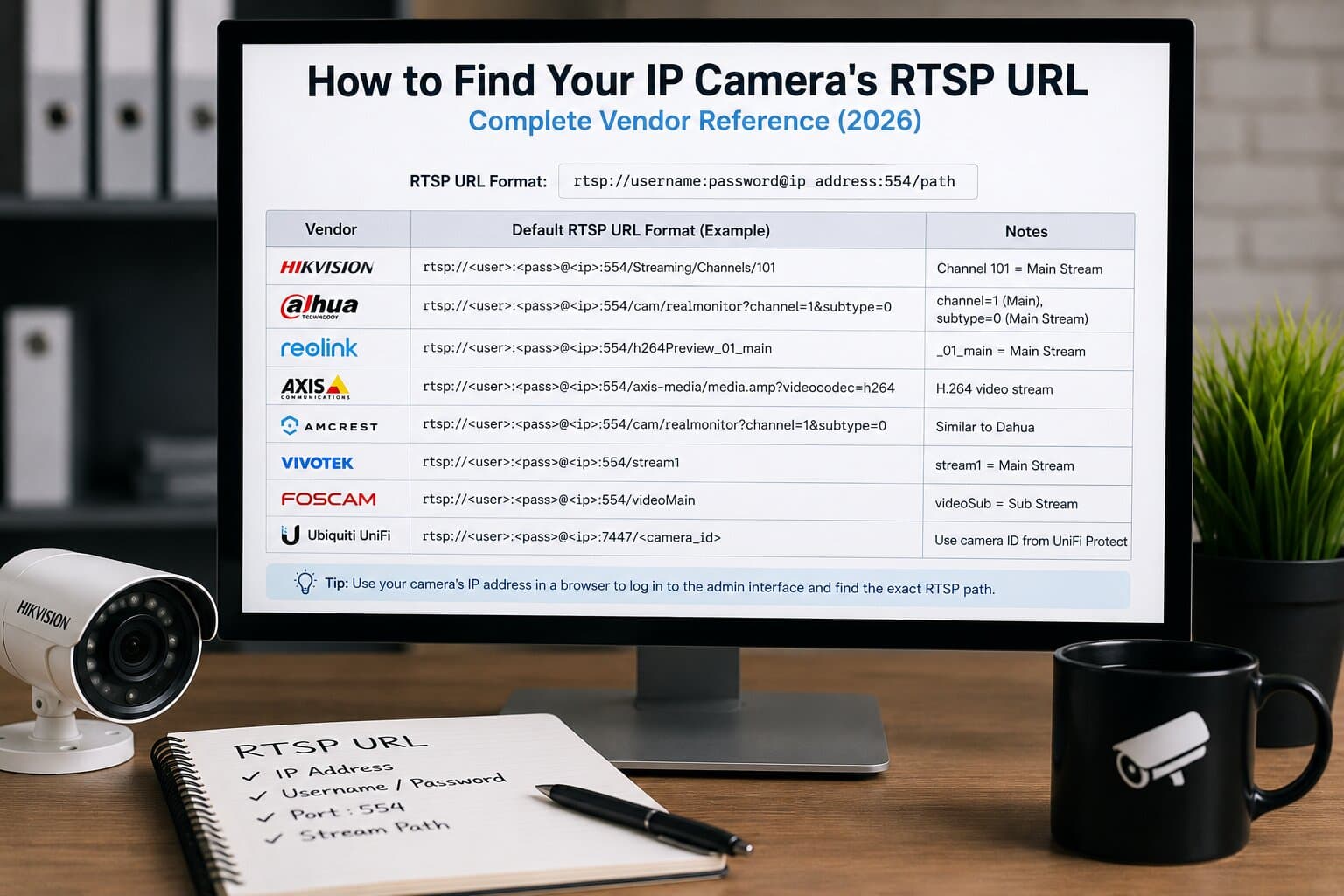
After configuration changes, RTSP URLs must be updated accordingly, including the new port number. A typical RTSP URL format includes credentials, IP address, port, and stream path.
Firewall and Network Requirements
RTSP requires more than just opening a single port in many environments. While TCP port 554 handles control signaling, media streams may use dynamically negotiated UDP ports for RTP. This can cause issues when strict firewalls or NAT devices are involved.
To ensure reliable operation, administrators should:
- Allow inbound TCP traffic on the configured RTSP port
- Permit RTP/RTCP port ranges if UDP streaming is used
- Prefer RTSP-over-TCP when operating across restrictive networks
- Verify that stateful firewalls correctly track RTSP sessions
In enterprise environments, placing RTSP devices behind a VPN or within a segmented VLAN is strongly recommended.
RTSP Port Security Risks
Leaving the RTSP port exposed without protection is a serious security risk. RTSP endpoints are actively scanned by automated tools searching for unsecured cameras and media servers. Once accessed, attackers may view live streams, collect metadata, or pivot deeper into the network.
Common risk factors include:
- Using default credentials with an open RTSP port
- Allowing anonymous RTSP access
- Exposing port 554 directly to the internet
- Running outdated firmware with known RTSP vulnerabilities
Security should never rely on obscurity alone, such as simply changing the port number.
Best Practices for Securing RTSP Ports
A secure RTSP implementation combines multiple layers of protection. Authentication should always be enabled, using strong, unique credentials and modern digest authentication where supported. Anonymous or guest access should be disabled entirely.
Encryption is equally important. Where possible, RTSP should be wrapped in TLS using RTSPS, which encrypts control traffic and prevents credential leakage. For media streams, SRTP should be enabled if supported by the device or server.
Network-level protections add another layer of defense. RTSP ports should be accessible only from trusted IP ranges, using firewall rules or IP whitelisting. Direct exposure to the public internet should be avoided; VPN access is a far safer alternative for remote viewing.
Regular firmware and software updates are essential, as RTSP-related vulnerabilities are periodically discovered and patched by vendors.
Troubleshooting RTSP Port Issues
When RTSP streams fail to connect, port configuration is often the root cause. Common symptoms include connection timeouts, authentication errors, or streams that connect but do not display video.
Effective troubleshooting steps include:
- Verifying the RTSP port with network scanning tools
- Testing connectivity locally before testing remotely
- Checking firewall logs for blocked packets
- Ensuring credentials are correctly encoded in the RTSP URL
- Confirming that the device supports RTSP-over-TCP if UDP is blocked
Packet analysis tools can also be used to inspect RTSP negotiation and identify where communication breaks down.
RTSP Port Management in Professional Environments
In professional streaming, surveillance, or industrial systems, RTSP ports should be treated like any other critical network service. This means documented configurations, controlled access, monitoring, and periodic audits.
Administrators should maintain an inventory of RTSP endpoints, assigned ports, authentication methods, and exposure levels. Logs should be reviewed regularly for unusual access patterns, and changes should be tested in controlled environments before production deployment.
Conclusion
The RTSP port may seem like a small configuration detail, but it plays a central role in live video streaming reliability and security. Understanding default port behavior, configuring ports correctly, and applying proper security controls are essential steps for any administrator working with IP video systems.
A well-configured RTSP port ensures stable streaming, protects sensitive video feeds, and prevents surveillance infrastructure from becoming an attack vector. In modern networks, careful RTSP port management is not optional, it is a baseline requirement for secure and professional video deployments.