RTSP Camera - Complete Setup and Configuration Guide
Learn how to set up and configure an RTSP camera, enable streaming, secure access, and integrate with software like OBS, NVRs, and video platforms.
%2520(7)-1.png&w=3840&q=75)
An RTSP camera uses the Real Time Streaming Protocol to deliver low-latency video streams over IP networks. This technology is widely used in industrial environments, manufacturing facilities, security systems, and advanced home monitoring, where reliable real-time video access is required. Unlike consumer cloud cameras, RTSP cameras provide direct stream access, full control over configuration, and easy integration with professional software and video platforms.
How RTSP cameras work, how to configure them step by step, how to secure access, and how to troubleshoot common issues?
What Is an RTSP Camera?
An RTSP camera is an IP camera that exposes its video stream via the RTSP protocol. RTSP handles session control - such as play, pause, and stop - while the video itself is usually transported using RTP. This separation enables low latency and precise control, which is why RTSP cameras are commonly used in:
- manufacturing and production monitoring,
- video analytics and computer vision,
- professional live streaming workflows,
- network video recorders (NVRs) and VMS platforms,
- smart home systems and automation platforms.
Compared to browser-based or cloud-only cameras, RTSP cameras offer greater flexibility, better performance in local networks, and independence from vendor cloud services.
Hardware Setup and Network Connection
Proper hardware installation is the foundation of a stable RTSP stream. Most RTSP cameras support either a dedicated power adapter or Power over Ethernet (PoE). PoE is strongly recommended in professional environments, as it simplifies cabling and improves reliability.
Connect the camera to the network using Ethernet whenever possible. While some RTSP cameras support Wi-Fi, wired connections provide lower latency, higher throughput, and fewer packet drops, especially important for continuous streaming in industrial settings. After powering the device, verify that the camera’s status LEDs indicate successful network connectivity.
Once connected, the camera will receive an IP address from the router or DHCP server.
Enabling RTSP on the Camera
RTSP is not always enabled by default and must be activated through the camera’s management interface.
Access the camera’s web interface by entering its IP address into a browser. The IP address can be found using the manufacturer’s discovery tool, the router’s DHCP table, or a network scanning utility. Log in using the default credentials provided by the manufacturer and change them immediately to prevent unauthorized access.
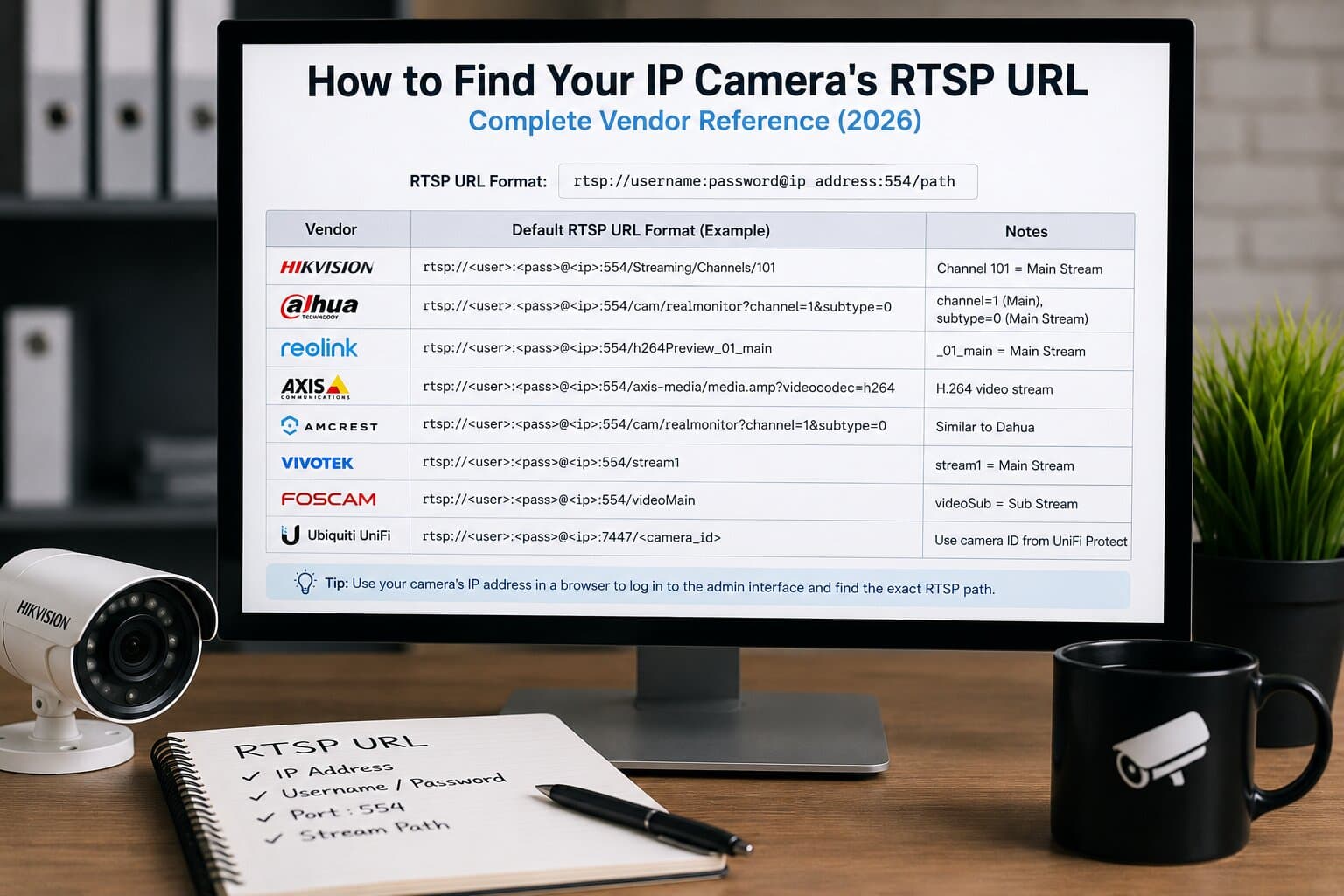
In the configuration menu, navigate to network, video, or streaming settings and enable RTSP. The default RTSP port is typically 554, though many cameras allow this to be changed. After enabling RTSP, the camera will display the RTSP stream URL, which includes the protocol, IP address, port, and stream path.
RTSP URL Structure and Brand Differences
RTSP URLs vary slightly between manufacturers. Most cameras provide at least two streams: a main stream (high quality) and a sub-stream (lower bandwidth). Testing the RTSP URL in a media player such as VLC is the fastest way to confirm correct configuration.
Typical RTSP URLs include authentication credentials, which means access control must be handled carefully. In production environments, credentials should never be embedded in public or externally exposed URLs.
Software Integration Options
RTSP cameras integrate easily with a wide range of software tools.
Media players such as VLC or FFmpeg are commonly used to test streams and verify performance. Video management systems and NVRs rely on RTSP for continuous recording and playback. Live streaming software can ingest RTSP streams and redistribute them using other protocols.
OBS Studio allows RTSP cameras to be used as live video sources by adding them as media inputs. Home automation platforms can integrate RTSP cameras to display live feeds on dashboards or trigger events based on video availability. Industrial analytics platforms often consume RTSP streams for AI-based inspection, anomaly detection, or safety monitoring.
Security Best Practices for RTSP Cameras
RTSP cameras should be treated like any other network-connected infrastructure component. Leaving default credentials or exposing RTSP ports directly to the internet creates serious security risks.
Strong, unique passwords must be configured for all camera accounts. Anonymous or guest access should be disabled entirely. If remote access is required, RTSP traffic should be tunneled through a VPN rather than exposed via port forwarding.
Whenever supported, encrypted transport should be enabled. Some cameras support RTSP over TLS (RTSPS), while others rely on secure network segmentation. Firmware should be kept up to date, as RTSP-related vulnerabilities are periodically discovered and patched by manufacturers.
Placing RTSP cameras on a dedicated VLAN is a recommended practice in professional networks.
Common Problems and Troubleshooting
RTSP camera issues are often related to network configuration rather than the camera itself.
If a stream fails to connect, first verify the IP address and RTSP port. Assigning a static IP address prevents future connection issues caused by DHCP reassignment. Firewalls should allow RTSP control traffic and, if applicable, RTP media ports.
If video stutters or drops frames, reduce resolution or frame rate and confirm that sufficient network bandwidth is available. In manufacturing environments with shared networks, congestion is a frequent cause of unstable streams.
Authentication errors usually indicate incorrect credentials or unsupported authentication modes in the client software. Testing with a known-compatible tool like VLC helps isolate these issues.
Recommended Use Cases
RTSP cameras are particularly well suited for environments that require reliability, low latency, and system integration. In manufacturing, they provide real-time visibility into production lines and support AI-based quality inspection. In security and monitoring, they integrate with professional NVRs and VMS platforms. In live streaming, RTSP cameras act as stable video sources for further distribution via RTMP, HLS, or WebRTC.
Conclusion
An RTSP camera offers a powerful and flexible foundation for professional video streaming and monitoring. With correct hardware setup, careful network configuration, and strong security practices, RTSP cameras deliver reliable low-latency video suitable for industrial, commercial, and advanced home applications.
Understanding how RTSP works, and how to configure it properly, ensures stable operation, protects your network, and allows seamless integration with modern video platforms and analytics systems.