
Wireless Live Streaming Camera - Complete Guide
A wireless live streaming camera setup gives you the flexibility to broadcast high-quality video from virtually anywhere, without being tied down by cables.
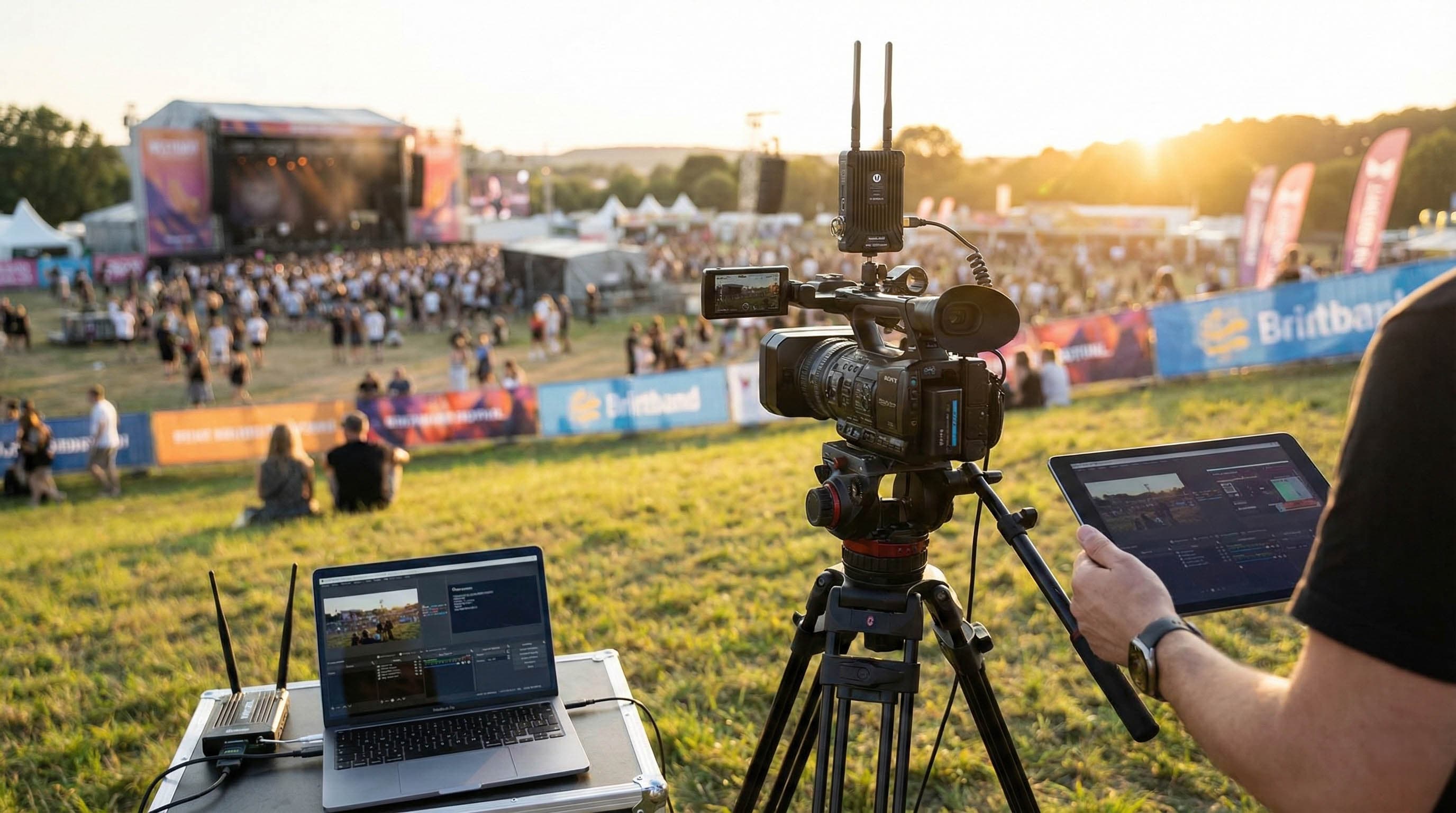
Whether you’re covering an outdoor event, streaming a webinar, or filming live commerce, wireless streaming solutions make production more mobile, adaptable, and professional.
Essential equipment for a wireless streaming camera setup
Camera
Any camera with an HDMI output can be used, but for professional streaming, choose one that supports 1080p Full HD or higher.
Wireless video transmitter and receiver
These devices send your video feed wirelessly from the camera to your streaming device. Popular options include Hollyland Mars 300 Pro series.
- Transmitter connects to your camera’s HDMI output.
- Receiver connects to your laptop or encoder.
Wireless microphone
For clear, synced audio, use systems like Rode Wireless Go, which connect directly to your camera or audio interface.
Capture card
If streaming from a computer, a USB capture card converts HDMI output from the receiver into a format your laptop can use.
Streaming device or encoder
You can use:
- laptop + software encoder (OBS Studio, Streamlabs Desktop),
- hardware encoder (ATEM Mini, LiveU Solo) for portable reliability.
Stable internet connection
A consistent upload speed of at least 5 Mbps for 1080p streaming is recommended.
Wireless streaming workflow
- Connect your camera’s HDMI output to the wireless video transmitter.
- Place the receiver near your streaming device or encoder.
- Connect the receiver’s HDMI output to your capture card or hardware encoder.
- Set up your wireless microphone and sync it with your camera’s audio.
- Launch your streaming software (e.g., OBS Studio) and configure:
- RTMP server URL,
- stream key from your platform (YouTube, Twitch, Facebook Live, Realtime, etc.).
- Test your stream for video and audio sync before going live.
- Go live with confidence.
Latency in professional wireless transmitters like the Hollyland Mars 300 is around 0.1 seconds, which is acceptable for most live streaming use cases.
WiFi configuration and range optimization
A wireless live streaming camera setup depends on a stable, interference-free connection:
- Use 5 GHz frequency for reduced interference and higher throughput.
- Keep transmitter and receiver in line of sight whenever possible.
- Avoid physical obstructions like walls, metal scaffolding, or crowded RF environments.
- Scan channels and choose the least congested one.
- For multi-camera wireless setups, ensure each transmitter is on a unique channel to prevent cross-talk.
If using WiFi-enabled cameras (e.g., IP cameras with RTSP streaming), connect them to a dedicated router to isolate your stream from public networks.
Battery management
Battery life can make or break a wireless stream, especially on long shoots:
- Fully charge all batteries before each event.
- Use external battery packs or V-mount batteries for cameras and transmitters during long sessions.
- Keep spare batteries ready for quick swaps.
- For fixed locations, connect devices to AC power to avoid downtime.
Ensuring stability during the stream
- Test network speed before the event; aim for double the required bitrate for safety.
- Use bonded internet solutions or mobile hotspots with LTE/5G fallback in unstable environments.
- Lower bitrate or resolution if connection quality drops.
- For critical streams, have a backup wired camera or second wireless link ready.
Troubleshooting interference issues
Wireless streaming can be affected by nearby devices and environmental conditions:
- Switch frequency bands (2.4 GHz ↔ 5 GHz) if interference is detected.
- Move transmitters away from WiFi routers, Bluetooth devices, and high-voltage equipment.
- Shorten the distance between transmitter and receiver.
- Use directional antennas to focus the signal in the required direction.
Single vs. multi-camera wireless setups
Single camera setup:
- Camera + wireless transmitter (Hollyland Mars 300 Pro).
- Receiver + capture card + laptop with OBS.
Multi-camera setup:
- Multiple transmitters/receivers.
- HDMI switcher or multi-cam software (Streamlabs, Mevo Multicam App).
- Central encoder to manage scene switching.
Advantages and use cases
Wireless streaming camera setups are ideal for:
- outdoor events - sports, festivals, concerts,
- corporate webinars and product launches,
- live commerce - streaming product showcases without cable clutter,
- mobile journalism and field reporting.
They offer portability, reduce trip hazards, and enable dynamic camera movement for more engaging productions.
Final thoughts - making wireless live streaming reliable
A well-planned wireless live streaming camera setup gives you professional flexibility without the limitations of cables. By optimizing WiFi range, managing power effectively, and protecting against interference, you can ensure a stable, high-quality broadcast from almost anywhere. With Realtime as your streaming platform, you can:
- ingest a single RTMP or RTSP stream from your wireless camera system,
- distribute it globally via a secure CDN,
- enable remote viewing on any device,
- automatically record, create clips, and share time-lapses.
%2520(11).png&w=3840&q=75)
%2520(10).png&w=3840&q=75)